


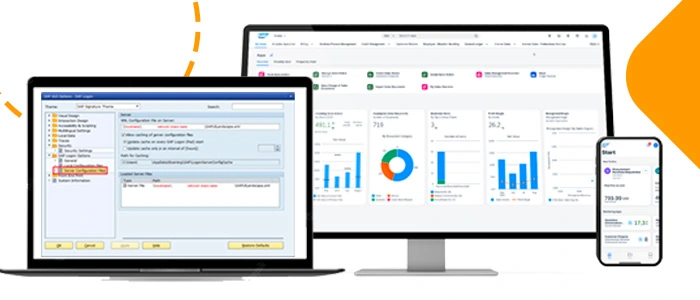
Report Generation in SAP S/4HANA refers to the process of obtaining and visualizing relevant data in the form of reports to make informed decisions within an organization. Both the traditional GUI (Graphical User Interface) and Fiori (SAP’s modern, design-focused user interface) offer ways to generate reports in SAP S/4HANA, each with its own characteristics and approaches.
What is SAP GUI?
SAP GUI (SAP Graphical User Interface) is software developed by SAP that allows users to interact with SAP’s enterprise systems and applications using a graphical interface. SAP is a German company that offers software solutions for business management, such as Enterprise Resource Planning (ERP) systems, Customer Relationship Management (CRM), Supply Chain Management (SCM), and more.
SAP GUI acts as the main window through which users can access and work with the modules and functions of SAP’s various software solutions. It provides an intuitive, window-based interface that facilitates navigation through systems, data entry and querying, execution of business transactions, and running business processes.
As SAP has evolved, so has its graphical interface, undergoing different versions and improvements in terms of usability, functionality, and appearance.
Report Generation in the Traditional GUI:
When we talk about report generation, we are referring to the process of creating and presenting reports or documents that contain relevant data and analysis in a structured and understandable way for users.
These reports are typically designed to provide valuable information about various aspects of an application, system, or dataset, helping users make informed decisions and better understand the information presented.
Report generation in a traditional GUI typically involves the following steps:
1Accessing the transactionLog in to your SAP S/4HANA system and access the transaction that corresponds to the type of report you want to generate. For example, “MM01” to create a new material or “MB51” to query inventory movements.
2. Entering parameters: On the transaction screen, enter the relevant parameters for your report, such as dates, material codes, cost centers, etc. These parameters vary depending on the type of report you are generating.
3. Report Execution: Once you have entered the parameters, execute the report by clicking the corresponding button. The system will process the information and present the results on the same screen or in a pop-up window.
4. Visualization and Export: Examine the results presented on the screen. In the traditional GUI, you generally have options to customize the presentation of the data, such as sorting, filtering, and grouping. You can also export the results to different formats, such as Excel or PDF, if necessary.
What is SAP Fiori?
SAP Fiori is a user experience (UX) design and platform developed by SAP, a leading enterprise software company. This platform aims to improve the usability, appearance, and functionality of SAP enterprise applications, offering a more modern, intuitive, and user-centered user experience.
SAP Fiori is based on responsive design principles, which means that applications designed with Fiori are adaptable to different devices and screen sizes, such as desktops, tablets, and mobile phones. This allows users to access SAP applications conveniently from any device, improving accessibility and flexibility.
Applications developed within the framework of SAP Fiori are characterized by having an elegant and minimalist appearance, with a focus on simplicity and efficiency in interaction. Fiori provides a series of predefined design patterns and consistent visual elements that help developers create cohesive and engaging user interfaces.
In addition to improving the user experience, SAP Fiori also seeks to increase the productivity of business users by providing faster access to relevant functionalities and data. Fiori applications are designed to be contextual, meaning they present relevant information at the right time and allow users to perform tasks efficiently.
SAP Fiori covers a wide range of business areas, such as human resources, finance, sales, purchasing, logistics, and more. It includes a library of pre-built applications and also offers tools and resources for organizations to customize and create their own Fiori applications according to their specific needs.
Report Generation in SAP S/4HANA using SAP Fiori:
Report Generation in SAP Fiori refers to the process of creating, visualizing, and distributing reports in an environment based on the modern and user-centered user interface of SAP Fiori. SAP Fiori is a platform that provides an intuitive and consistent user experience for interacting with SAP enterprise applications, allowing users to access relevant information and perform tasks efficiently.
Report Generation in SAP Fiori involves the following:
1. Accessing the Fiori application: Log in to your SAP S/4HANA system and navigate to the SAP Fiori Launchpad using your web browser. Here you will find a series of Fiori applications organized into tiles according to their function.
2. Selecting the application: Search for and select the Fiori application corresponding to the type of report you want to generate. Fiori applications are designed to be more intuitive and user-centered.
3. Entering parameters: As in the traditional GUI, enter the required parameters for the report in the fields provided in the Fiori application.
4. Report Execution: After entering the parameters, activate the report execution. The Fiori application will process the request and display the results on the same screen or in a separate view.
5. Interacting with Results: In Fiori applications, you will often find interactive features and more modern data visualizations. You can explore the results, perform actions such as filtering and sorting, and charts and pivot tables are often used to present information in a more user-friendly way.
6. Export and Additional Actions: Fiori applications typically offer options to export results to different formats, as in the traditional GUI. In addition, they may provide integration with other Fiori applications for additional actions based on the report results.
Remember that the experience may vary depending on the specific version of SAP S/4HANA you are using and the Fiori applications available in your system.
Is a report better in Gui or in Fiori?
At Xamai, we know that both GUI and Fiori have specific advantages depending on business needs, and their effectiveness depends on the specific requirements of your organization and user preferences.
If your users value modernity, adaptability, and ease of use, Fiori may be the preferred choice. However, if advanced features are needed that are not yet available in Fiori, or if your users are more familiar with SAP GUI, it may make sense to continue using this interface.
In many cases, organizations choose a combination of both interfaces to meet different needs.
If you are looking to optimize the experience and efficiency in your SAP environment, Xamai and our expert consultants are here to guide you in choosing between SAP GUI and SAP Fiori. Our deep understanding of both platforms allows us to assess your specific needs and business objectives.
Whether you are looking for the familiarity of SAP GUI or the modernity and usability of SAP Fiori, we will provide you with personalized guidance. Reach out to us to discover how you can improve your operations and maximize the value of your SAP solution.
Ready to talk to SAP specialists?
Tell us what your company needs and we'll help you find the best path.
Request information






 English
  Español de México
  Español