


Learn how these flexible programming interfaces allow the integration of additional functions into your SAP solutions, giving you greater control and adaptability.
SAP BAdI, which means "Business Add-In" in English, is a technology used in the SAP system (Systems, Applications & Products in Data Processing) to extend the standard functionality of its applications.
BAdIs allow developers to add or customize code at specific points in the standard program execution without directly modifying the original source code.
This facilitates the adaptation of SAP applications to the specific requirements of a company without affecting system updates.
BAdIs are interfaces that allow the extension of functionalities in SAP in a modular and flexible way.
What are SAP BAdIs?
BAdIs, or Business Add-Ins, are an extension tool in the SAP system (Systems, Applications & Products in Data Processing) that allows developers to add customized functionalities to the standard SAP applications without directly modifying the source code of those applications.
They are designed to facilitate the extensibility and adaptability of SAP software.
Some key features of BAdIs include:
1. Extensibility: They allow the addition of custom business logic without modifying the original SAP source code.
2. Entry Points: BAdIs offer specific points in the standard SAP code where developers can add their own logic.
3. Filtering: They can be filtered to apply only in specific situations, providing flexibility to customize functionality according to business needs.
4. Multiple Implementations: They can have multiple implementations, allowing different developers or teams to add their own logic without interfering with each other.
5. Release Independence: They help minimize dependence on the standard source code, facilitating system updates and migrations.
When a standard SAP application is executed, BAdIs provide a mechanism to activate and execute custom business logic at the points defined by the BAdI.
This allows companies to adapt their SAP systems more easily and efficiently to their specific needs without relying heavily on direct modifications to the standard source code, which simplifies system management and improves upgrade capabilities.
Business Add-ons: search, display and implement BAdIs
To search, display, and implement BAdIs in SAP, you can follow these general steps. Keep in mind that the details may vary slightly depending on the specific version of SAP you are using:
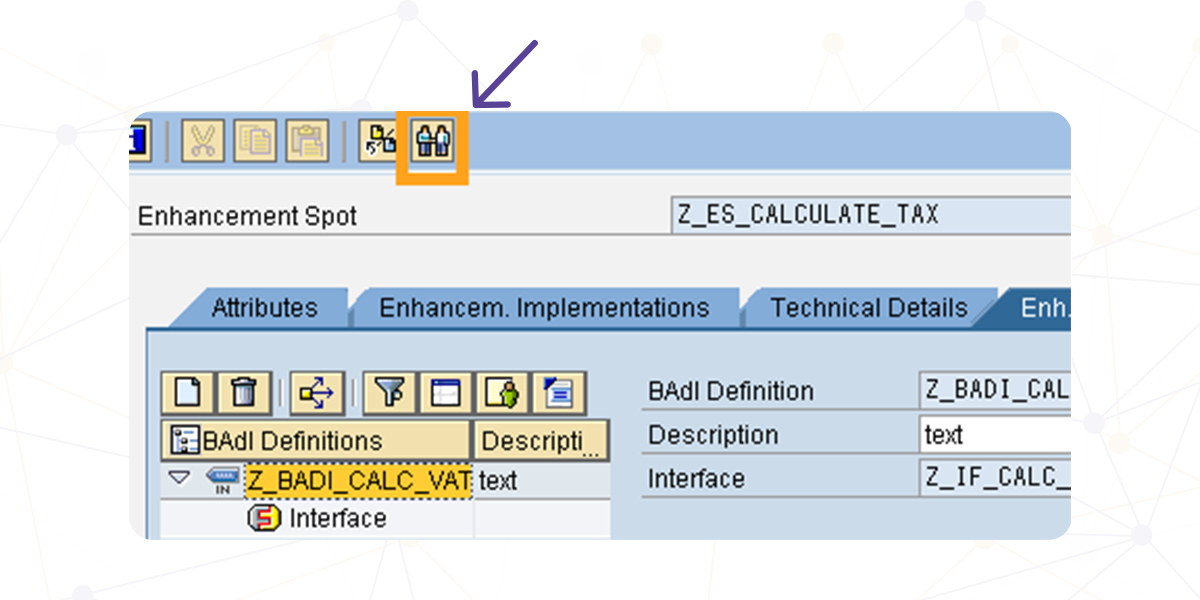
Searching for BAdIs:
- Transaction SE18:
Enter the transaction `SE18` in the SAP command bar.
Select the radio button “BAdI” and provide the name of the BAdI or a name range if you don't know the exact name.
Click the “Display” button to view the existing BAdIs. - Transaction SE80:
Another option is to use the transaction `SE80`.
Navigate to the “BAdIs” tab in the Object Repository.
Search for the desired BAdI using filters or simply by browsing the hierarchy.
Viewing BAdIs:
- Transaction SE18:
After finding the BAdI, click the “Display” button to see details such as the name, description, and available methods. - Transaction SE80:
In the “BAdIs” tab, select the BAdI and click the “Display” button to see additional details.
Implementing BAdIs:
- Transaction SE18:
After viewing the BAdI, select the “Implementations” option from the menu.
Here, you can see if there are already existing implementations. If not, you can create a new implementation. - Transaction SE19:
If you need to create a new implementation, you can use the transaction `SE19`.
Enter the name of the BAdI and click the “Create Implementation” button. Provide a name and description for the implementation. - Implementing Methods:
After creating the implementation, you can implement specific methods within the BAdI.
Click on "Methods" in the implementation screen and select the method you want to implement. - Implementation Code:
Enter the custom code in the implemented method to add your specific business logic. - Activation:
After writing the code, activate the implementation and verify that it is active in transaction `SE18` or `SE80`.
Please note that these steps are general and may vary depending on the specific version of SAP you are using.
Also, you must have the appropriate permissions to perform these actions in SAP system enhancements.
It is recommended to perform these tasks in a development or test environment before implementing in a production environment.
Finding the Appropriate BAdI
Finding the appropriate BAdI in SAP can be a specific process depending on the requirement or the functional area for which you are looking for an extension. Here are some general steps you can follow to find the appropriate BAdI:
1. Identify the Requirement:
Before searching for a BAdI, clearly identify what business requirement or functionality you want to extend or customize in the SAP system. This will help you focus your search on the correct areas.
2. SAP Documentation:
Review the official SAP documentation related to the module or functionality for which you need the extension. SAP provides detailed documentation that often includes information about available BAdIs for extensions.
3. Search Transactions:
Use the specific SAP transactions to search for BAdIs. Some of the common transactions include:
– SE18 (BAdI Builder):
– Enter the transaction `SE18` and search by the name or description of the BAdI.
– SE80 (Object Navigator):
- Use the `SE80` transaction and navigate to the “BAdIs” tab in the Object Repository.
4. Contextual Help:
Within the `SE18` or `SE80` transactions, you will often find a contextual help option. Use this option to obtain detailed information about the available BAdIs and their use.
5. Consult with Experts:
If you are working in a team environment or have access to functional or technical experts, consult with them. People with experience in SAP can often provide valuable information about the BAdIs relevant to a particular requirement.
6. Review Existing Implementations:
In the `SE18` transaction, you can review existing implementations for a BAdI. This will give you an idea of how they are being used and who implemented them.
7. Web Search and Forums:
Check SAP community forums or specialized websites. You may find discussions and examples of similar use cases, which could lead you to the appropriate BAdIs.
8. Search in the SAP Transaction Guide:
The SAP transaction guide (SAP Easy Access Menu) sometimes includes search options that allow you to find configurations and objects related to a specific area.
The search for BAdIs can be specific to the SAP module you are working in, and names and descriptions may vary. Taking the time to understand the structure and naming conventions of the functional area in question will help you successfully find BAdIs.
Our consultants are ready to guide you through the complexities of BAdIs, offering clarity and solutions tailored to your requirements.
Whether you are looking to enhance standard functionality, add custom business logic, or simply explore extension possibilities, we are here to provide the support you need.
Ready to talk to SAP specialists?
Tell us what your company needs and we'll help you find the best path.
Request information







 English
  Español de México
  Español