


Implementing an ERP (Enterprise Resource Planning) in a company involves the adoption of an integrated management system that coordinates and centralizes the organization's key operations and processes.
The ERP covers areas such as finance, human resources, sales, inventory, and production, enabling efficient information flow and task automation.
By implementing an ERP, the company seeks to improve operational efficiency, optimize data-driven decision-making in real time, increase visibility and control over business processes, as well as improve internal and external communication.
The ERP provides a single platform that unifies information, simplifies administration, and promotes process standardization, which can lead to increased productivity and business competitiveness.
Benefits provided by the ERP system to companies
The enterprise resource planning system (ERP, for its acronym in English) provides a series of benefits to companies.
Firstly, the ERP integrates and centralizes data and processes from different areas of the organization, which allows for greater operational efficiency and more informed decision-making. In addition, the ERP automates repetitive tasks and simplifies workflows, which reduces costs and improves productivity.
It also facilitates communication and collaboration between departments, promoting greater coherence and alignment within the company. The ERP system provides a global and real-time view of the company, which facilitates the identification of trends, the detection of opportunities, and risk management.
In general, the ERP contributes to optimizing resources, improving efficiency and decision-making, and strengthening the competitiveness and growth of companies.
How long does it take to implement a management software?
The time required to implement a management software can vary depending on various factors, such as the complexity of the system, the scope of the required functionalities, the size of the organization, and the resources available.
In general, implementing a management software can take from a few weeks to several months. The process involves stages such as requirements analysis, system design, software development, testing, user training, and data migration.
Furthermore, it is important to consider that successful implementation also depends on proper planning, collaboration between the teams involved, and effective change management within the organization.
Steps for ERP implementation
Implementing an ERP system can be a complex process and requires proper planning as we have mentioned before. Below, we will explain the six main steps to implement an ERP:
1. Planning and needs assessment: Before starting the ERP implementation, it is essential to perform proper planning. This involves assessing the organization's needs and determining the expected objectives and results of the ERP system. You should involve all relevant stakeholders and establish a clear timeline for implementation.
2. ERP provider selection:
Once you have defined your needs and objectives, you must select an ERP provider that meets your requirements. XAMAI is an excellent provider option for SAP ERP implementation due to its experience, knowledge, proven track record, comprehensive approach, post-implementation support, and focus on innovation. Their experience and customer-centric approach allow them to provide effective and customized solutions that drive business growth and efficiency.
3. Customization and configuration
After selecting the ERP provider, it is necessary to customize and configure the system according to your organization's processes and requirements. Work closely with the provider to define how the ERP will be adapted to your specific needs. This may include customizing modules, configuring workflows, integrating with existing systems, and configuring user permissions.
4. Data migration
One of the critical aspects in the ERP implementation phase is data migration from the old systems to the new system. You must identify the relevant data that you need to transfer to the ERP and develop a migration plan. Ensure you clean and validate the data before migration to guarantee the integrity and accuracy of the information in the new system.
5. Training and testing
Before launching the ERP, it is essential to train users on its use and perform thorough testing of the system. Provide adequate training to employees who will use the ERP, both in terms of functionality and workflow. In addition, carry out rigorous testing to ensure that the system works correctly, identify potential problems, and correct them before the final implementation.
6. Implementation and monitoring
Once the ERP system is configured, the data has been migrated, and the users are trained, you can proceed to the final implementation. This involves putting the ERP into operation and allowing users to begin using it in their daily work. Make sure to monitor and evaluate the system's performance after implementation to identify any problems or adjustments needed.
Remember that the ERP implementation project may vary in its phases according to the specific needs and characteristics of each organization, so these general steps may require adaptation in your particular case.
It is important to have a dedicated project team and the active participation of senior management to ensure the success of the implementation.
The life cycle of an ERP in a company
After implementation, the usage and operation stage of the ERP follows, where the company takes advantage of the system's functionalities to administer and optimize its business resources. This stage can last several years, during which updates, improvements, and adjustments are made to keep the ERP aligned with changes in the organization and the business environment.
Finally, the time comes for the replacement or renewal phase, when the existing ERP is updated or replaced by a new solution, generally due to technological obsolescence or the need to meet changing business requirements.
How can an ERP be adapted to your business?
Adapting an ERP to a specific business involves a process of customization and configuration to meet the particular needs and requirements of the company.
This involves identifying the necessary modules and functions, defining workflows and internal processes, and customizing the interface and reports according to the company's preferences and requirements.
In addition, integrations with other existing systems can be developed to ensure smooth data communication.
Adapting an ERP as part of a solution for a business seeks to optimize resource management, improve operational efficiency, and obtain a complete and real-time view of the different areas of the company, which can lead to better decision-making and sustainable growth.
Why is Xamai one of the best ERP providers in Mexico?
At Xamai, we are recognized as one of the best SAP ERP providers in Mexico for several outstanding reasons. Firstly, our platform offers a wide range of functionalities and modules that adapt to the specific needs of Mexican companies, covering key aspects such as finance, inventory, production, sales, and human resources.
Furthermore, we have a solid reputation in the market thanks to our focus on product quality, constant innovation, and excellent customer service.
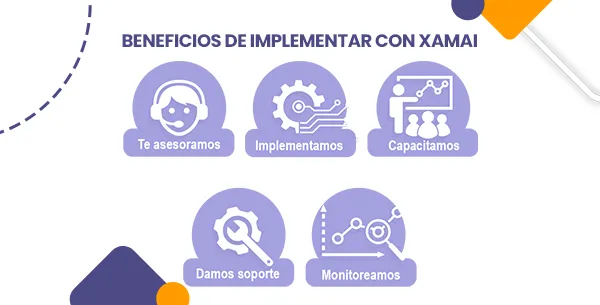
We have a team of highly trained professionals and a commitment to customer satisfaction, which have been key pieces of our success, providing customized solutions, timely technical support, and a comprehensive training program.
At Xamai, we stand out as one of the best SAP ERP providers in Mexico due to our complete and adaptable offering, our focus on quality and customer satisfaction, and our total ability to meet the needs of companies in the Mexican business environment.
If you have any questions, please contact us to be part of your projects.
Ready to talk to SAP specialists?
Tell us what your company needs and we'll help you find the best path.
Request information







 English
  Español de México
  Español